


Hear Clear: Hear from Distance
4.1321.00 Reviews
App Specs
- Version
- 2.1.2
- Updated On
- License
- Free
- Downloads
- 500,000+
- Developer
- Bizcraft Apps
- Categories
- Medical
- Platform
- Android, iOS
Screenshots
 Analysis by AppCompare
I like the idea behind Hear Clear: Hear from Distance: use a phone as a way to make nearby sounds easier to listen to through headphones. That can be useful when I’m struggling to follow one speaker in a quiet room, but it is not a substitute for a hearing aid or a medical assessment. The distinction matters: this is a practical listening aid for particular situations, not a treatment for hearing loss.
What amplified listening can—and cannot—do
The app sits in the medical category, and its central appeal is straightforward: it aims to help you hear sounds that are harder to catch at a distance. In practice, the phone’s microphone is doing the listening, while headphones or earbuds let you hear the amplified audio. The phone therefore needs to be positioned where it can pick up the speaker clearly; holding it in a pocket or pointing its microphone away can undermine the whole point.
This setup can make a voice more noticeable, but amplification does not magically separate one person from every other sound. A microphone captures what reaches it, including room noise and competing conversation. I would think of the app as a way to make a chosen listening position more convenient, not as a promise that every distant word will become clear.
Set up for a useful listening position
For a talk, class, or meeting where I’m allowed to use it, I would place the phone on a stable surface nearer the speaker, then listen through headphones at a comfortable level. That arrangement can be more effective than keeping the microphone beside me at the back of a room. It also means planning ahead: the phone must stay close enough to the sound source, and the headphones need to be comfortable for the length of the session.
There is a practical trade-off here. If the phone is near the speaker, it may be away from me, so I need a reliable way to monitor the audio and keep the device in a suitable position. If I can’t place the phone appropriately, the benefit may be limited. I would test the setup briefly before an important lecture or conversation rather than discovering a poor microphone angle halfway through.
A sensible everyday use case
Imagine sitting at a family gathering where a relative is speaking from across a quiet room. I could set the phone down closer to that person and listen through earbuds, instead of repeatedly asking them to speak up. The same basic approach may help when following a speaker in a calm meeting space. It is less suited to a crowded restaurant, a moving outdoor setting, or any situation where several people are talking at once and the phone cannot be positioned near the voice I want to hear.
I would also be considerate about privacy. Listening through a phone placed near other people can feel intrusive, especially if they do not know it is being used. I would use it openly and only in situations where recording or amplified listening is appropriate. That is a better habit than treating the app as a discreet way to monitor conversations.
Worth Reading Before You Choose

EA SPORTS FC Mobile 26 Is a Bigger Football Game, but It Takes Time

Flipboard Shows What News Apps Must Do Beyond the Feed

Switching to Android Auto Means Rethinking Your Driving Routine

Google Calendar Makes a Crowded Week Easier to Manage

Ludo King Makes the Most of the Minutes Between Plans

Baby Panda World Brings Quick Play to Modern Phones, but Its Game Library Feels Busy
Getting Started with Hear Clear
Downloading and setting up Hear Clear: Hear from Distance was a breeze. Available for both Android and iOS, this app promises to enhance your hearing experience by amplifying distant sounds. Once installed, diving into the app was straightforward. The interface is clean, with intuitive controls that even tech newbies will find easy to navigate.
The Main Features
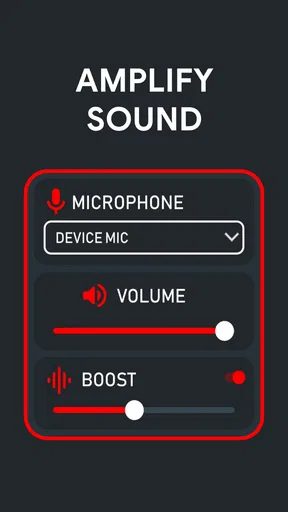
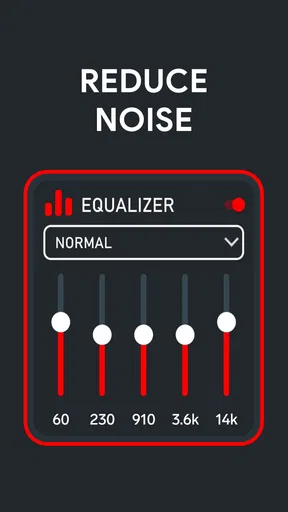
What immediately caught my attention was the app's ability to customize sound frequencies. This means you can adjust the settings to focus on specific sounds, whether it's a whisper from across the room or a bird chirping in the distance. The app also offers noise cancellation features, which is a real game-changer when you’re in a noisy environment.
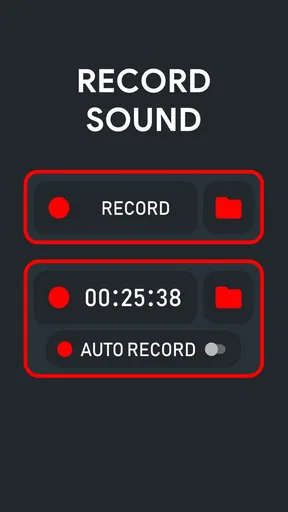
Another standout feature is the live audio streaming. This allows you to stream audio to a Bluetooth headset or earbuds, providing a seamless listening experience. It's perfect for those moments when you need to be subtle about your eavesdropping! There's also an option to record audio, which can come in handy if you need to revisit a conversation later on.
Using it around other people
Before relying on any frequency adjustment or noise reduction, I would try the default sound first, then make small changes while the speaker repeats a short sentence. This gives me a fair comparison and helps avoid turning up a setting that makes speech harsher without making it easier to understand. A useful test is whether I can follow the words at a comfortable volume, not whether the sound simply feels louder.
The recording option also deserves care. A recording can be useful when I have permission to capture a talk and want to review it later, but it should not be treated as a substitute for taking notes or as an excuse to record private conversations. I would check consent and local expectations before using it. For a class or appointment, asking first is the simplest way to avoid an uncomfortable situation.
Real-Life Use and Performance
I took Hear Clear: Hear from Distance on a test run during a family gathering. With multiple conversations happening simultaneously, the app performed admirably. I could easily zero in on one conversation without getting overwhelmed by background noise. It felt like having super hearing powers!
In quieter settings, like a lecture hall, the app truly shines. The clarity of sound and the ability to adjust frequencies meant that I could hear every word spoken, even from the back of the room. It’s a handy tool for students or anyone attending conferences and workshops.
Where it fits among hearing options
Compared with simply turning up a phone’s volume, a listening-amplifier app is more purposeful because it is designed around hearing sound through headphones and adjusting what you hear. But it still depends on the phone microphone and the room. A dedicated hearing device is generally the more appropriate route for ongoing hearing difficulty, while a venue’s assistive listening system may be a better choice when one is available and compatible. I would choose this app for an occasional, low-pressure listening need—not as my only support for everyday communication.
If you often miss speech even when someone is nearby, or find yourself increasing the volume in many different settings, I would not keep trying to solve that with an app alone. A hearing professional can help identify what is going on and whether a properly fitted device is needed. The app makes most sense as a stopgap or situational tool for someone who can hear adequately in ordinary conditions but wants extra help in a specific setup.
Things to Keep in Mind
While the app is pretty impressive, it's not without its quirks. The effectiveness of the app can vary based on the device's microphone quality. On older smartphones, the performance might not be as stellar. Also, while the noise cancellation works well, it’s not foolproof. Extremely loud environments can still pose a challenge.
Battery consumption is another aspect to consider. Running the app continuously can drain your phone’s battery faster than usual, so it’s a good idea to keep a charger handy if you plan on using it extensively.
There is also a small preparation cost that is easy to overlook: headphones must be charged or available, the phone needs enough battery for the session, and the microphone should be placed where it can hear the intended speaker. For a short conversation, that setup may feel like more effort than simply moving closer or asking someone to repeat themselves. For a long talk where moving seats is not practical, the extra steps may be worthwhile.
Cost, compatibility, and who should try it
Bizcraft Apps offers the app free to download, with optional in-app purchases priced from $0.99 to $3.99 per item. It has an average rating of 4.0 from around 21,000 ratings, with 317 written reviews and over 500,000 installs. It is rated for Everyone, was released on December 27, 2021, and the current version is 1.2.0.2; the minimum operating system requirement is 8.0.
Those details make it easy to try without an upfront purchase, but I would start with the free experience and decide whether the actual listening setup helps before spending on anything optional. The app’s value depends less on a feature list than on whether your phone microphone, headphones, placement, and listening environment work together for you. If you use it regularly, check your battery and test your preferred settings before you need them.
I can see this being most useful for someone who occasionally struggles to hear a speaker in a quiet, predictable place and is comfortable placing a phone near the sound source. It is a weaker fit for people who need reliable help throughout the day, those who cannot use headphones, or anyone expecting an app to remove loud background noise. In those cases, asking about a venue’s listening support or seeking professional advice is a more dependable next step.
Final Thoughts
All in all, Hear Clear: Hear from Distance is a nifty tool that can make a real difference in how you experience sound. Whether you're trying to listen in on a distant conversation or just want to enhance your hearing in specific environments, this app delivers on its promises. Just be sure to have a decent pair of headphones and a fully charged phone to get the best out of it.
If you're someone who often finds themselves straining to hear, or if you're just curious about the world of sound amplification, give this app a try. It might just become your new favorite tool!
Pros
- Easy-to-navigate interface for all users.
- Real-time sound amplification feature.
- Customizable sound profiles available.
- Works well with Bluetooth headphones.
- Low battery consumption.
Cons
- Background noise can be an issue.
- Limited free version features.
- Requires internet for certain functions.
- Ads may interrupt usage occasionally.
- Not compatible with all devices.
FAQs for Hear Clear: Hear from Distance
What is Hear Clear: Hear from Distance and how does it work?
Hear Clear: Hear from Distance is an innovative app designed to enhance your hearing capabilities by capturing distant sounds and transmitting them to your headphones. Utilizing your device’s microphone, the app amplifies and clarifies sounds, making it easier to hear conversations or noises that are usually out of range. It’s particularly useful in lecture halls, meetings, or noisy environments.
Is Hear Clear: Hear from Distance safe to use?
Yes, Hear Clear: Hear from Distance is safe to use. It respects user privacy by not recording or storing any audio data. The app processes sound in real-time without saving it, ensuring your conversations and surroundings remain private. However, always ensure you have consent when using it to listen to conversations from afar.
What are the main features of Hear Clear: Hear from Distance?
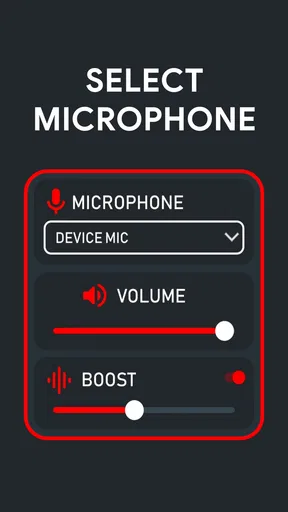
The app offers several key features including adjustable sound amplification, noise reduction, and customizable equalizer settings. Users can tweak these settings to enhance their listening experience depending on the environment. Additionally, the app supports Bluetooth connectivity, allowing seamless use with wireless headphones.
Does Hear Clear: Hear from Distance require internet access to function?
No, Hear Clear: Hear from Distance does not require an internet connection to function. It operates entirely offline by using your device’s built-in microphone and speakers or headphones. This makes it an ideal choice for use in areas with poor connectivity or when you’re trying to conserve data usage.
Are there any device compatibility issues with Hear Clear: Hear from Distance?
Hear Clear: Hear from Distance is compatible with most modern Android and iOS devices. However, the app performs optimally on devices with updated operating systems and good quality microphones. Users with older models might experience latency or reduced sound quality, so it's recommended to check the app's requirements before downloading.


